
$39.54
Add to Cart
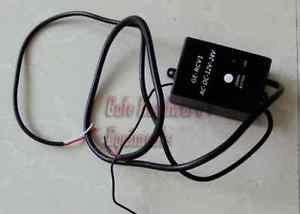
NSEE GE-RCV1 12/24V Extended Receiver for PY600AC SL600AC Automatic Gate Openers


More than 10 available
Details
Shipping: Australia: free (more destinations)
Sales Tax: check
Condition: Brand new
Returns: 30 days, buyer pays return shipping (more)
*The store has not been updated recently. You may want to contact the merchant to confirm the availability of the product.
Working voltage: 12V – 24VAC/DC
Frequency: 433.92 MHZ
Instructions of Standalone Receiver GE-RCV1
1. Wire connecting (2 core electric cables)
a. Red wire to power 12-24VDC
b. White wire to GND
2. Wire connecting (4 core electric cables)
a. White wire to OPEN
b. Red wire to CLOSE
c. Blue wire to STOP
d. Black wire to GND (or COM)
3. Transmitter learning
a. Check wire connecting before switch on the power
b. Press “LEARN BUTTON”, LED light is on, and then it will enter to
learning process.
c. Press “1” button two times, then LED light flashing. Then the
learning process is successed.
d. If “1” button is effective, White wire and black wire contact.
e. If “2” button is effective, red wire and black wire contact.
f. If “4” button is effective, blue wire and black wire contact.
g. Button”3” is null.
4. Transmitter
Transmitter: rolling code, 433.92MHz
5. Erase remote transmitters from the external receiver
Press and hold the learn button until the indicator light turns off,
then all transmitters will be removed from the external receiver.
Disclaimer: For use when the Gate or Garage Operator doesn't have
capabilities of Smart or Wireless Options, this receiver will enable
the ability of use the Smart Wireless Keypad
Frequency: 433.92 MHZ
Instructions of Standalone Receiver GE-RCV1
1. Wire connecting (2 core electric cables)
a. Red wire to power 12-24VDC
b. White wire to GND
2. Wire connecting (4 core electric cables)
a. White wire to OPEN
b. Red wire to CLOSE
c. Blue wire to STOP
d. Black wire to GND (or COM)
3. Transmitter learning
a. Check wire connecting before switch on the power
b. Press “LEARN BUTTON”, LED light is on, and then it will enter to
learning process.
c. Press “1” button two times, then LED light flashing. Then the
learning process is successed.
d. If “1” button is effective, White wire and black wire contact.
e. If “2” button is effective, red wire and black wire contact.
f. If “4” button is effective, blue wire and black wire contact.
g. Button”3” is null.
4. Transmitter
Transmitter: rolling code, 433.92MHz
5. Erase remote transmitters from the external receiver
Press and hold the learn button until the indicator light turns off,
then all transmitters will be removed from the external receiver.
Disclaimer: For use when the Gate or Garage Operator doesn't have
capabilities of Smart or Wireless Options, this receiver will enable
the ability of use the Smart Wireless Keypad


