
$24.58
Add to Cart
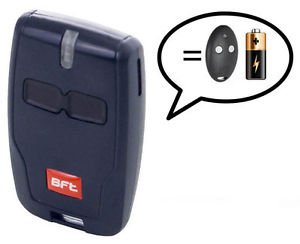
BFT Mitto 2 B RCB02 R1 Button D111904 433MHz Remote Control Garage Gate Opener


More than 10 available
Details
Shipping: Australia: free (more destinations)
Sales Tax: check
Condition: Brand new
Returns: 30 days, buyer pays return shipping (more)
*The store has not been updated recently. You may want to contact the merchant to confirm the availability of the product.
For BFT gates, garage doors, barriers or other BFT automation systems. It can be easily programmed from an existing device or from the control panel. The remote control comes with programming instructions that show you how to "learn" new unit from an existing one.
It works on 433.92 MHz and it can be used with universal receivers as well.
Blue
Technical specification:
Model MITTO 2 B RCB
Frequency 433.92 MHz
Number of button 2
Power Battery A23 12V
Coding Rolling Code
How To Program BFT Mitto
The following process will only work if your control panel has been enabled for remote programming by the installer. If the following process does not work you will need the assistance of an approved BFT installer
You must be at the control panel. (It does not need to be open)
You will need one existing, functional, transmitter already coded on the system
and any new/replacement transmitters readily to hand.
The following sequence must be followed sequentially in rapid succession; any pause in the process will cause the system to time out.
Read and familiarise yourself with the process before commencing.
1. Press the hidden button on the back of the transmitter already stored on the system for 2 seconds
(If it has no hidden button use the top two front buttons together instead)
Old type Mitto New type Mitto
2. Press the functioning button on the front of the transmitter already stored on the system for 2 seconds
3. Press the hidden button on the back of the new transmitter for 2 seconds
(If it has no hidden button use the top two front buttons together instead)
4. Press the desired button on the front of the new transmitter for 2 seconds
Repeat 3 & 4 for as many transmitters as are to be added to the system, but ensure there is no pause between operations to prevent time out
5. Leave 20 Seconds before attempting to use your new transmitter(s) for the board to reset
Coding is now complete
If this process fails to enable your new transmitter(s) contact your local approved BFT Installer
It works on 433.92 MHz and it can be used with universal receivers as well.
Blue
Technical specification:
Model MITTO 2 B RCB
Frequency 433.92 MHz
Number of button 2
Power Battery A23 12V
Coding Rolling Code
How To Program BFT Mitto
The following process will only work if your control panel has been enabled for remote programming by the installer. If the following process does not work you will need the assistance of an approved BFT installer
You must be at the control panel. (It does not need to be open)
You will need one existing, functional, transmitter already coded on the system
and any new/replacement transmitters readily to hand.
The following sequence must be followed sequentially in rapid succession; any pause in the process will cause the system to time out.
Read and familiarise yourself with the process before commencing.
1. Press the hidden button on the back of the transmitter already stored on the system for 2 seconds
(If it has no hidden button use the top two front buttons together instead)
Old type Mitto New type Mitto
2. Press the functioning button on the front of the transmitter already stored on the system for 2 seconds
3. Press the hidden button on the back of the new transmitter for 2 seconds
(If it has no hidden button use the top two front buttons together instead)
4. Press the desired button on the front of the new transmitter for 2 seconds
Repeat 3 & 4 for as many transmitters as are to be added to the system, but ensure there is no pause between operations to prevent time out
5. Leave 20 Seconds before attempting to use your new transmitter(s) for the board to reset
Coding is now complete
If this process fails to enable your new transmitter(s) contact your local approved BFT Installer


