
$22.89
Add to Cart
US Automatic / Sentry 300 2 & 4 Button Remote Control Clicker Gate Door Operator
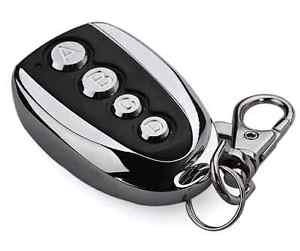


More than 10 available
Details
Shipping: Australia: free (more destinations)
Sales Tax: check
Condition: Brand new
Returns: 30 days, buyer pays return shipping (more)
*The store has not been updated recently. You may want to contact the merchant to confirm the availability of the product.
Operate gate or garage with compatible 433 MHz receiver Operates up to 300 ft typically.
Transmitter 2-4 Button Remote Setup: Transmitter Left Button to Receiver Programming: (standard Open/Stop/Close function) Press and hold the left transmitter button down. Red light on transmitter should be on. On the receiver, push the P1 push-button until the green LD light comes on. Release both buttons.
Transmitter Right Button to Receiver Programming: (Hold-Gate-Open) (Only if auto close timer is enabled) The 2-channel receiver allows for programming the P2 relay from momentary mode (default) to latching mode. Transmitter right button can be programmed to hold gate open, over-riding the auto-close feature if activated. Press and hold the right transmitter button down. Red light on transmitter should be on. Press the P2 push-button until the green LD light comes on. Release both buttons.
Receiver Programming: Relay P2 programming from momentary to latching mode (to hold gate open) Press the P2 push-button until the green LD light comes on, then release. Green LD light should be steady. While the green LD light is on, push the P1 push-button down and release. Green LD light should be flashing.
Resetting receiver P2 relay to momentary mode: Press the P2 push-button until the green LD light comes on, then release. Green LD light should be flashing. While the LD light is flashing, push the P1 push-button down and release. Green LD light should be steady.
Erasing all Transmitters from Receiver Memory: Press the P2 button on the receiver until the green LD light comes on. Then release P2 button. While LD light is on press the P1 and P2 buttons simultaneously and hold until the green LD light begins to blink slowly. It should blink 4 times then all transmitter codes are erased.
Verifying Receiver P2 relay is programmed to latching mode: Press the P2 push-button until the green LD light comes on, then release. Green LD light should be flashing. If green LD light is steady, redo the Receiver Programming section above.
Transmitter 2-4 Button Remote Setup: Transmitter Left Button to Receiver Programming: (standard Open/Stop/Close function) Press and hold the left transmitter button down. Red light on transmitter should be on. On the receiver, push the P1 push-button until the green LD light comes on. Release both buttons.
Transmitter Right Button to Receiver Programming: (Hold-Gate-Open) (Only if auto close timer is enabled) The 2-channel receiver allows for programming the P2 relay from momentary mode (default) to latching mode. Transmitter right button can be programmed to hold gate open, over-riding the auto-close feature if activated. Press and hold the right transmitter button down. Red light on transmitter should be on. Press the P2 push-button until the green LD light comes on. Release both buttons.
Receiver Programming: Relay P2 programming from momentary to latching mode (to hold gate open) Press the P2 push-button until the green LD light comes on, then release. Green LD light should be steady. While the green LD light is on, push the P1 push-button down and release. Green LD light should be flashing.
Resetting receiver P2 relay to momentary mode: Press the P2 push-button until the green LD light comes on, then release. Green LD light should be flashing. While the LD light is flashing, push the P1 push-button down and release. Green LD light should be steady.
Erasing all Transmitters from Receiver Memory: Press the P2 button on the receiver until the green LD light comes on. Then release P2 button. While LD light is on press the P1 and P2 buttons simultaneously and hold until the green LD light begins to blink slowly. It should blink 4 times then all transmitter codes are erased.
Verifying Receiver P2 relay is programmed to latching mode: Press the P2 push-button until the green LD light comes on, then release. Green LD light should be flashing. If green LD light is steady, redo the Receiver Programming section above.


